
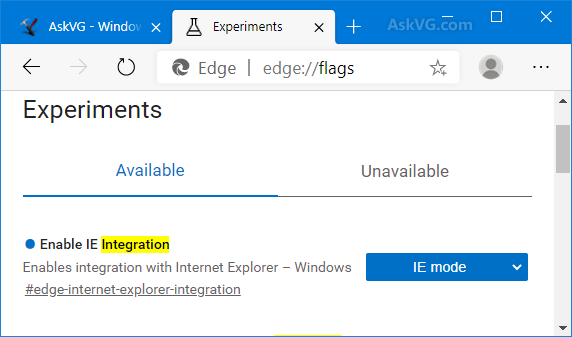
Internet explorer flags
First, an important truth:
Internet Explorer does NOT have Chrome-style “flags.”
It never had a publicchrome://flagsequivalent.
What people call “IE Flags” are really:
- Hidden Feature Control Registry Keys
- Group Policy experimental toggles
- Enterprise Mode / IE Mode configuration
- Developer & compatibility switches
These were mostly meant for system admins and developers — not everyday users — and could break system stability if misused.
Also:
Internet Explorer has been retired and disabled (Windows 10 and up).
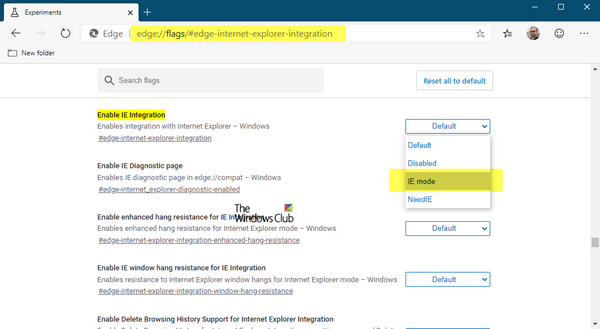
Edge “IE Mode” is now the supported alternative.
The Windows Club
Contents
🔍 What “IE Flags” Really Included
1️⃣ Feature Control Settings (Registry “Flags”)
These are advanced switches stored in the Windows Registry.
Common areas:
HKCU\Software\Microsoft\Internet Explorer\Main\FeatureControl\HKLM\Software\Microsoft\Internet Explorer\Main\FeatureControl\
Examples of features previously controlled here:
- Legacy JavaScript engine tweaks
- Security sandbox behavior
- Compatibility rendering
- ActiveX policies
- GPU rendering
⚠️ Editing these without documentation = risk of:
- system instability
- browser crashes
- unexpected behavior
- security reduction
2️⃣ Group Policy “Flags”
Corporate environments used policies to enable hidden features.
Location:
Computer Configuration
 → Administrative Templates
    → Windows Components
       → Internet Explorer
Allowed toggling things like:
- Compatibility View policy
- Security restrictions
- Deprecated API support
- Browser Emulation
3️⃣ Enterprise Mode (The Only Useful “Flag” Left)
This was Microsoft’s big compatibility control feature.
Purpose:
Allow old corporate web apps to run correctly.
Key capabilities:
- Force IE11 to emulate IE5 / IE7 / IE8 / IE9 / IE10 rendering
- Domain-based rules
- XML configuration list
- Integration with Edge IE Mode today
Now lives inside Microsoft Edge as IE Mode.
4️⃣ Developer Tools Compatibility Switches
Pressing F12 in IE11 gave developers options to force:
- Browser mode (IE7 – IE11)
- Document mode (quirks / standards)
- User agent spoofing
These weren’t true flags, but many people treated them like experimental toggles.
⭐ Review — Were IE Flags Any Good?

Pros
- Helped transition from older IE versions
- Essential in corporate / government networks
- Deep control for system engineers
- Allowed old business apps to survive

Cons
- Microsoft no longer supports IE
- Mostly irrelevant for modern web
- Required registry/GPO knowledge
- Frequently broke the browser
- No simple “flags” UI like Chrome/Edge
- Not user-friendly
⚠️ Status Today (2025 Reality)
- Internet Explorer is retired
- Security updates have ended
- IE is disabled on Windows
- Edge IE Mode replaces anything useful
If you’re trying to:
- enable experimental features → impossible now
- tweak compatibility → use Edge IE Mode
- manage corporate environments → use Enterprise Site List Manager
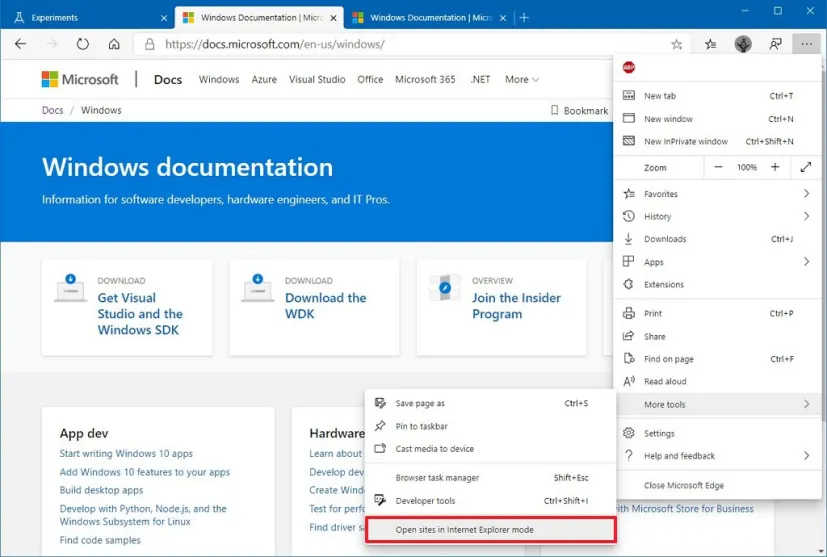
🧭 If You Actually Need IE Features Today
✅ Use Microsoft Edge IE Mode
Supports:
- Legacy enterprise sites
- ActiveX controls
- Old Intranet tools
You configure it through:
- Group Policy
- Enterprise Mode Site List
FAQs
Did Internet Explorer ever have about:flags?
No. Edge Legacy did. Chrome does. IE never did.
Can I still enable IE flags today?
Not realistically.
Anything left is corporate-only and controlled centrally.
Is it safe to use IE now?
No — security risk.
Use Edge IE Mode if required for business.
Are there modern browser flags similar to “IE flags”?
Yes — in:
Microsoft Edge → edge://flags
Chrome → chrome://flags
Firefox → about:config
What were IE “flags” actually used for?
They controlled hidden features like:
Legacy compatibility rendering
ActiveX behavior
Security policies
JavaScript / DOM engine settings
Enterprise compatibility fixes
Mostly used by IT admins, not regular users.
Where were IE “flags” located?
Primarily in the Windows Registry:
HKCU / HKLM Software\Microsoft\Internet Explorer\Main\FeatureControl
Also in Group Policy:
Computer Config → Admin Templates → Windows Components → Internet Explorer
What is Enterprise Mode / IE Mode?
A compatibility system allowing old business websites and legacy apps to run using the old IE rendering engine inside Microsoft Edge.
It supports:
Old intranet systems
Legacy corporate tools
ActiveX in controlled environments
🏁 Final Verdict
Internet Explorer flags were never consumer-friendly features.
They were hidden, registry-level tools mainly for IT professionals.
Today:
- They are obsolete
- Unsupported
- Replaced by Edge IE Mode
- Should NOT be used outside corporate environments
READ ALSO: Robocopy multithread: Why you need it?